v3.4Head-to-head records · compare two players · tap any ball strip · search your squadCheck it out
All help guides

How to save a team sheet you reuse every week

Full Match

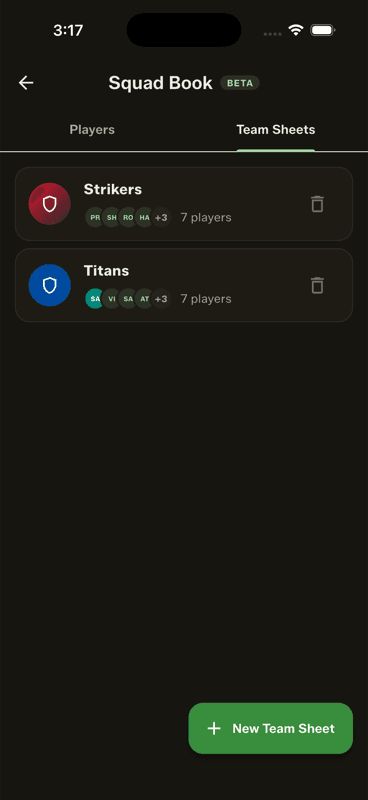
In the Squad Book, open Team Sheets and tap New Team Sheet. Name it, pick a colour, tick the players, and save. From then on a Full Match starts by choosing that sheet instead of picking players one by one.

Step by step

  1. 1

    Open the Team Sheets tab

    Squad Book → Team Sheets.

    Open the Team Sheets tab
  2. 2

    Tap New Team Sheet

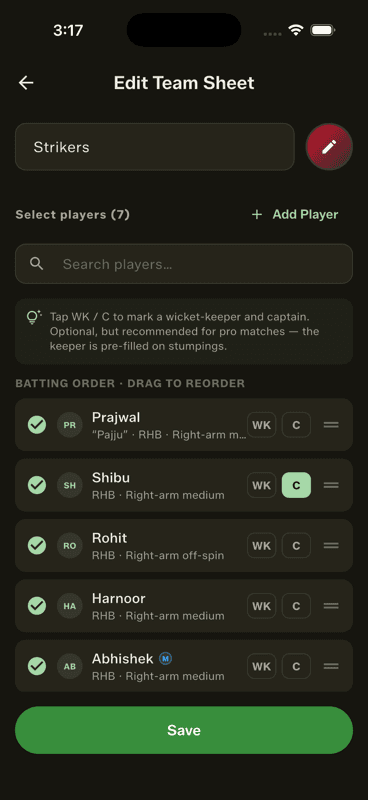
    Name the team and pick its colour — the colour drives the whole scoring screen.

  3. 3

    Tick the players

    Search or scroll, and tick everyone in the side. Drag to set the batting order.

    Tick the players
  4. 4

    Mark the keeper and captain

    Tap WK and C beside the right players. Optional, but the keeper is then pre-filled on stumpings.

  5. 5

    Save

    The sheet is now available in every Full Match setup.

Editing for one match only

In Full Match setup, the pencil beside a team edits that lineup for this match — drop the two who did not turn up, reorder the batting — without touching your saved sheet.

The WK and C marks are why the scorecard shows † beside the keeper and (c) beside the captain.

People also ask

How do I save a cricket team lineup for reuse?

Save it as a team sheet. In Gully Crix a team sheet stores the players, the batting order, the team colour and the keeper and captain marks, and you pick it at the start of every match.

Can I change a saved cricket lineup for one match?

Yes. Editing the lineup inside match setup applies to that match only and leaves your saved team sheet untouched.

How do I mark the wicketkeeper and captain in cricket?

Tap the WK and C buttons beside the right players in the team sheet. The scorecard then shows † for the keeper and (c) for the captain, and the keeper is pre-filled on stumpings.

Last updated 2026-08-09

Join Gully Crix Telegram Community