v3.4Head-to-head records · compare two players · tap any ball strip · search your squadCheck it out
All help guides

How to add a player to your squad

Full Match

Open the Squad Book, tap Add Player, and enter their name. Nickname, batting hand, bowling style, gender, photo and colour are all optional — but they are what tell two similar players apart later.

Step by step

  1. 1

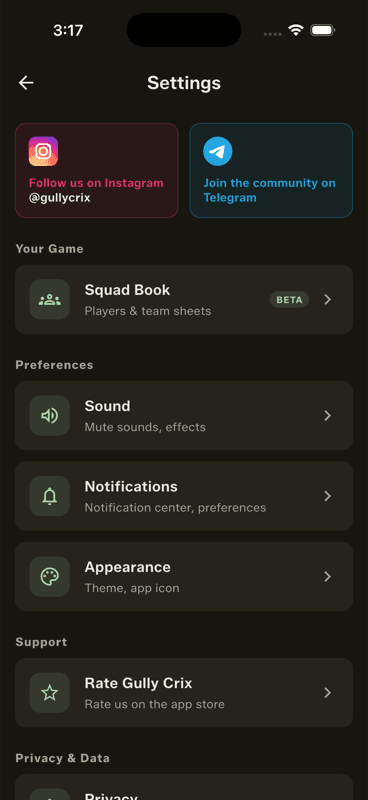
    Open the Squad Book

    Settings → Squad Book, or from the home screen.

    Open the Squad Book
  2. 2

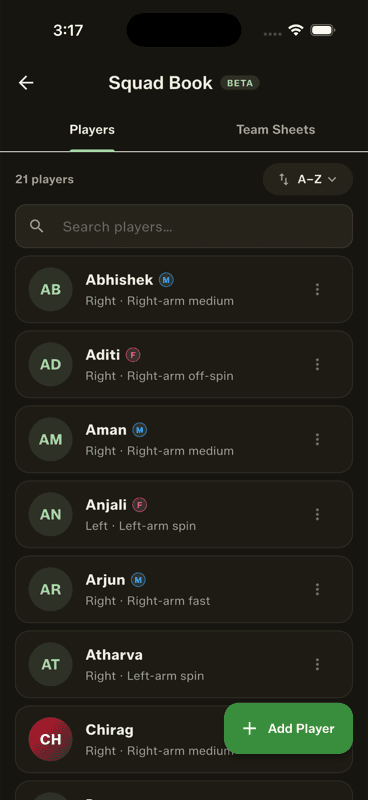
    Tap Add Player

    The green button at the bottom right of the Players tab.

    Tap Add Player
  3. 3

    Fill in what you know

    Only the name is required. Everything else can be added later by tapping the player and choosing Edit.

What each field buys you

  • Nickname — searchable, so typing “pajju” finds Prajwal.
  • Batting hand and bowling style — shown in every picker, so you can pick on merit mid-over.
  • Gender — an M/F chip for mixed and women's matches.
  • Photo and colour — the avatar that makes a name scannable in a long list.
In a hurry? Add just the name. You can enrich the profile any time, and past matches update to match.

Adding someone mid-match

Every batter and bowler picker has an Add player button when the late-joiners rule is on, so a latecomer can be created without leaving the match. They land in your Squad Book too.

People also ask

What details should I record for a cricket player?

At minimum a name. A nickname makes them searchable, batting hand and bowling style help you pick correctly mid-over, and a photo or colour makes them scannable in a long list.

Can I add a cricket player in the middle of a match?

Yes, if the late-joiners rule is on. Every batter and bowler picker has an Add player button, and the new player is saved to your Squad Book too.

Last updated 2026-08-09

Join Gully Crix Telegram Community