v3.6Now on Android: Single Player mode · team profiles · sort by any statCheck it out
All help guides
How to merge duplicate players into one career
Full Match
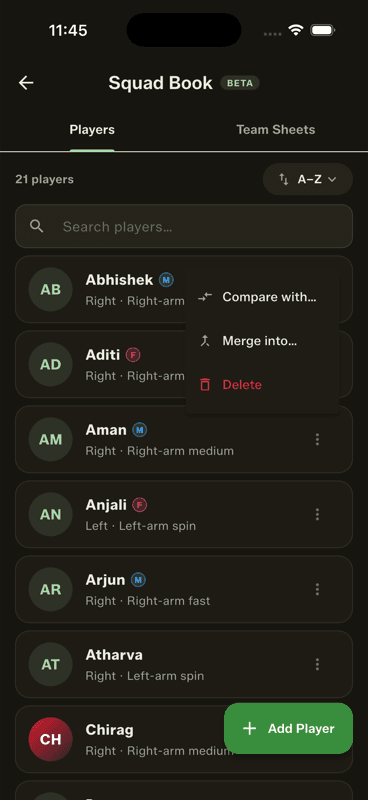
In the Squad Book, tap the three-dot menu on the duplicate player and choose Merge into…, then pick the player who should survive. Every match, ball and stat moves across, and the two records become one career.
Step by step
1
Open the duplicate's menu
In the Squad Book, tap the three-dot menu on the player you want to get rid of and choose Merge into….
2
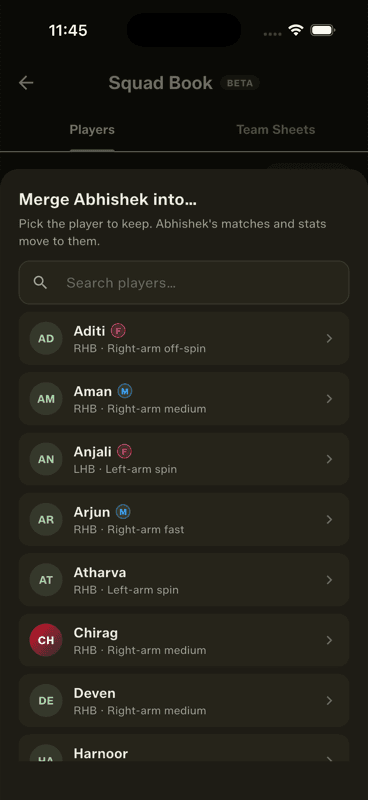
Pick the surviving player
A searchable picker lists everyone else in the squad. Choose the record that should remain.
3
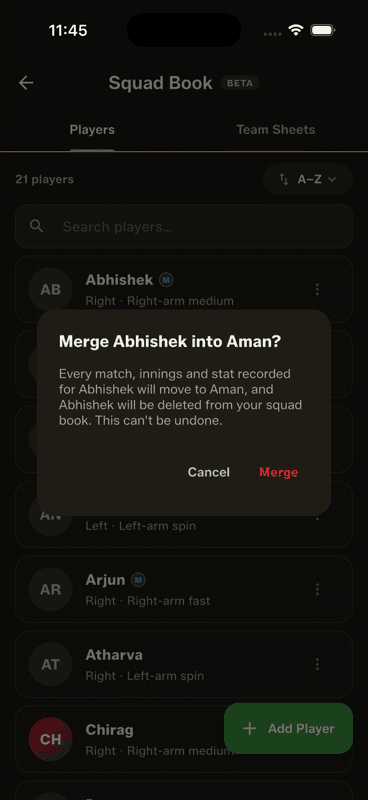
Confirm
The app asks 'Merge A into B?' before touching anything. Confirm, and every stored match is rewritten so the duplicate's deliveries belong to the survivor.
Why duplicates happen
Someone adds 'Rohit' from the lineup editor at the ground; a week later someone else adds 'Rohit S' at home. Both play matches. Now half of one player's career sits under each name, and neither record looks right.
What the merge actually does
It rewrites history, properly. Every ball the duplicate faced, bowled or fielded in every stored match is re-attributed to the surviving player — batting, bowling, catches, dismissals, head-to-heads, everything. Career stats are computed from those balls, so the merged career is simply correct rather than approximately added together.
Direction matters, and a merge cannot be undone. The player you opened the menu on disappears; the one you pick in the list survives, keeping their name, photo and colour. Check the confirmation line before you tap Merge.
Avoiding duplicates in the first place
The player search matches names and nicknames everywhere you pick players, so a quick search before adding someone new is usually enough to spot that they already exist.
People also ask
How do I merge two players with the same name in a cricket app?
Open the duplicate's menu in the Squad Book and choose Merge into…, then pick the record that should survive. Every stored match is rewritten so all deliveries belong to the surviving player.
Will merging players combine their cricket statistics?
Yes, and correctly rather than approximately — because career stats are computed from the actual balls, re-attributing the deliveries produces one genuinely accurate career.
Can a player merge be undone?
No. The merge rewrites match history, so check the confirmation line before tapping Merge — the player you opened the menu on is the one that disappears.