v3.6Now on Android: Single Player mode · team profiles · sort by any statCheck it out
All help guides
The innings break and chasing a target
Quick MatchFull Match
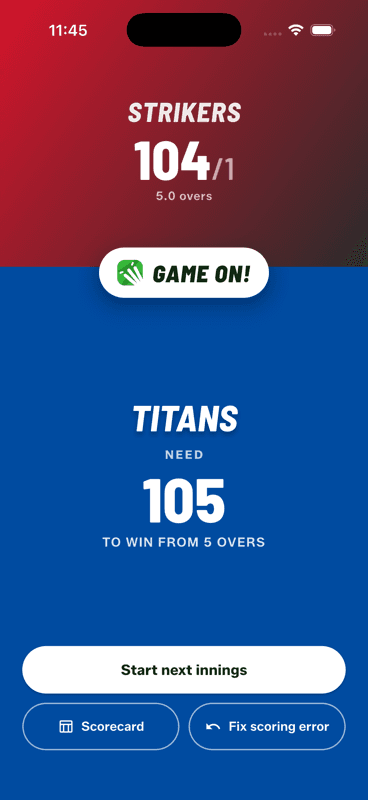
When the first innings ends, a full-screen break shows the total and the target. Tap Start next innings, pick the new openers and bowler, and the header switches from a projected score to runs required, balls left and the required rate.
The break screen
First innings total on top, the target below — plus Scorecard and Fix scoring error.
It is the natural moment to check the scorecard, or to fix anything that went in wrong during the first innings — both are one tap from here.
During the chase
The header stops projecting and starts demanding: runs required, balls remaining, and the required rate, updating every ball. It is the number everyone at the ground is asking for anyway.
The total overs are locked once the chase begins — changing them mid-chase would silently change what the target means. Adjust the length during the first innings instead.
When the chase ends
The app calls it the moment it is decided — the target passed, the overs gone, or the last wicket down — and takes you to the result screen with the margin, awards and sharing.
People also ask
How is the target calculated in cricket?
The chasing team needs one more run than the first innings total. So 126 all out means a target of 127.
What is required run rate in cricket?
The runs per over the chasing side still needs to win, calculated from the runs remaining and the balls left. It updates every ball.
What is a projected score in cricket?
An estimate of the first innings total if the current run rate continues to the end of the overs. It is replaced by the required rate once the chase begins.