v3.4Head-to-head records · compare two players · tap any ball strip · search your squadCheck it out
All help guides

Changing the total overs after the match has started

Quick MatchFull Match

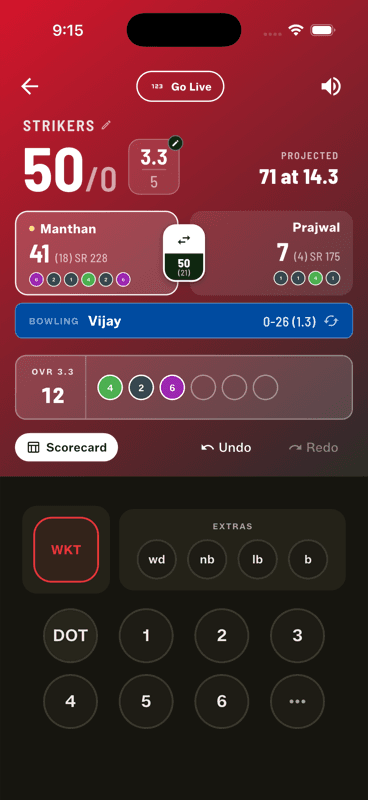
Turn on Change overs mid-match in Gully Rules, then tap the pencil on the overs counter while scoring. Works during the first innings only — once the chase starts, the target is fixed.

Step by step

  1. 1

    Turn the rule on at setup

    In Gully Rules, switch on Change overs mid-match.

  2. 2

    Tap the pencil on the overs counter

    On the scoring screen, the overs fraction carries a small edit pencil. Tap it and set the new total.

    Tap the pencil on the overs counter

Why it's first-innings only

The second innings is a chase of a target set over an agreed length. Changing the overs mid-chase would silently change what a fair target means, so the app locks the total once the second innings begins. Light fading? Decide the cut before the chase starts.

The classic uses

  • The ground is booked until 7 and the first innings ran long — cut 10 overs to 8.
  • Two more players turned up and everyone wants a longer game — stretch 6 overs to 10.

People also ask

Can you change the number of overs during a cricket match?

In gully cricket, by agreement — usually because of light, time or players arriving. Gully Crix allows it during the first innings, and locks it once the chase begins.

Why can't I change overs in the second innings?

The chase is against a target set over an agreed length. Changing the overs mid-chase would silently change what a fair target means, so the total is locked once the second innings starts.

How do you shorten a cricket match that is running late?

Cut the overs during the first innings. Decide before the chase starts, so both sides bat to the same length.

Last updated 2026-08-09

Join Gully Crix Telegram Community