v3.6Now on Android: Single Player mode · team profiles · sort by any statCheck it out
All help guides
What happens at the end of an over?
Quick MatchFull Match
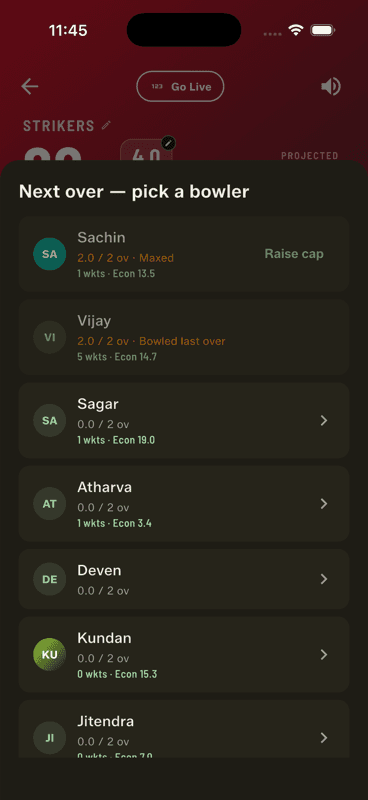
After six legal balls the app shows the over summary, swaps the strike automatically, and asks you to pick the next bowler. Whoever bowled the last over is greyed out, and anyone at their cap is marked Maxed.
The strike swaps by itself
Ends change at the end of every over, so the batter who was on strike moves to the non-striker's end automatically. You never tap anything for it — and if an odd single on the last ball has already swapped them, the app accounts for that too.
Choosing the next bowler
Each name carries overs used out of the cap, plus career wickets and economy.
Bowled last over — greyed out. Nobody bowls consecutive overs, same as the real game.
Maxed — at the max-overs-per-bowler cap. Raise cap lifts it for that one bowler if your game needs it.
Everyone else is fair game, with their figures shown so you can pick on form rather than memory.
Picked the wrong name?
Tap the refresh icon on the bowling bar. Before any ball is bowled it simply corrects the pick; once the over is under way it becomes a mid-over replacement and splits the over correctly between both bowlers.
Quick Match has no bowler picker — it doesn't track who is bowling. The over still completes and the strike still swaps.
People also ask
Do batsmen change ends at the end of an over?
Yes. The ends change after every over, so the batter who was on strike moves to the non-striker's end. Gully Crix handles it automatically.
Can the same bowler bowl two overs in a row?
No. A bowler cannot bowl consecutive overs, which is why the previous over's bowler is unavailable in the picker.
What happens when a bowler reaches their over limit?
They are marked as maxed and cannot be selected. Gully Crix has a Raise cap action if your game needs to lift the limit for one bowler.