v3.4Head-to-head records · compare two players · tap any ball strip · search your squadCheck it out
All help guides

Filter a player's stats by arena and ball

Full Match

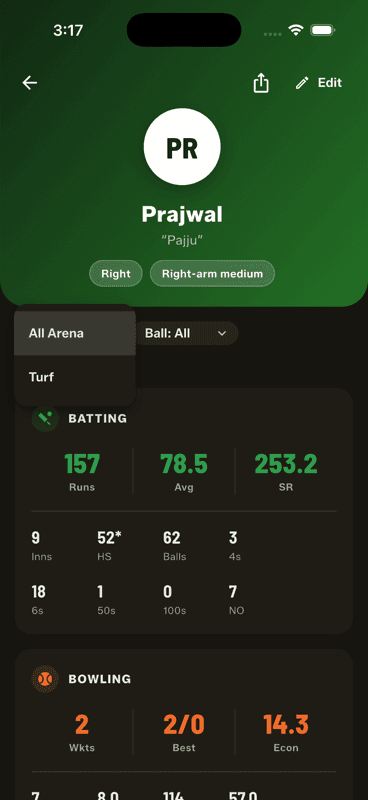
Use the Arena and Ball dropdowns on a player's profile to narrow their career to one surface or ball type — a tape-ball average on turf, say. The two filters combine, and only surfaces they have actually played on appear.

Step by step

  1. 1

    Open a player's profile

    Tap them in the Squad Book.

  2. 2

    Tap Arena or Ball

    Both sit just under the header and default to All.

    Tap Arena or Ball
  3. 3

    Combine them

    Set both and the stats recalculate for that exact combination.

Why this is more than a novelty

A tape-ball strike rate on a short turf pitch and a leather-ball strike rate on a full ground are not the same statistic, and averaging them together tells you nothing. Filtering separates them.

The dropdowns only list arenas and balls the player has actually played with — no empty options to wade through.

This is also why arena and ball are required at Full Match setup: every match has to be tagged for the filters to mean anything later.

People also ask

Are tennis ball and leather ball cricket stats comparable?

Not really. Different balls and surfaces produce very different scoring rates, which is why Gully Crix tags every match with its arena and ball and lets you filter a career by them.

Can I see a player's stats for one ground only?

You can filter by arena type — turf, ground, street, mohalla or stadium — so a player's turf record can be read separately from their street record.

Last updated 2026-08-09

Join Gully Crix Telegram Community