v3.4Head-to-head records · compare two players · tap any ball strip · search your squadCheck it out
All help guides

How to compare two players side by side

Full MatchNew in 3.4

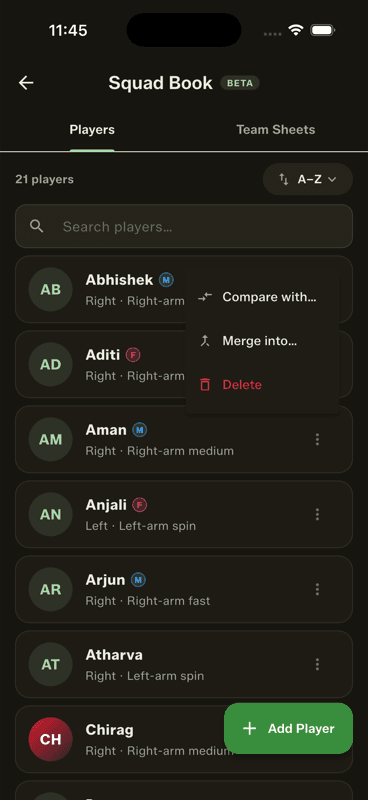
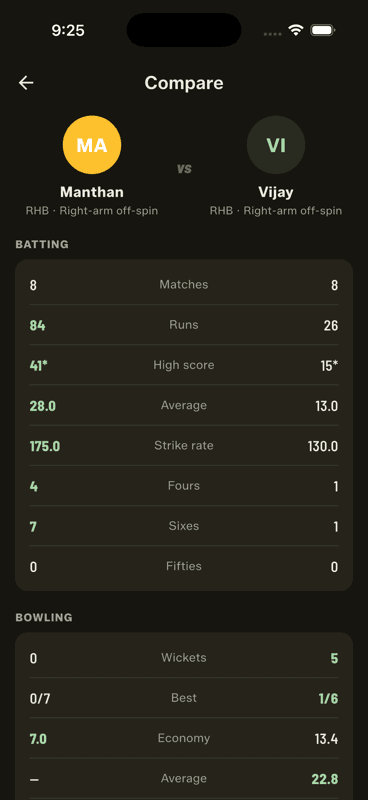
In the Squad Book, tap a player's three-dot menu and choose Compare with…, then pick the second player. Both careers appear side by side with the better value highlighted in every row.

Step by step

  1. 1

    Open the three-dot menu

    On any player in the Squad Book.

    Open the three-dot menu
  2. 2

    Choose Compare with…

    A searchable picker opens.

  3. 3

    Pick the second player

    The comparison builds immediately.

    Pick the second player

What is compared

  • Batting — matches, runs, high score, average, strike rate, 4s, 6s, fifties
  • Bowling — wickets, best figures, economy, average, overs
The highlight knows which direction “better” runs: for economy and bowling average, the lower number wins.

And head to head, below

Scroll past the tables and the same screen shows how these two have actually fared against each other — bat versus ball, both directions.

People also ask

How can I compare two cricket players' statistics?

Put their careers side by side. Gully Crix compares matches, runs, high score, average, strike rate, boundaries and fifties for batting, plus wickets, best, economy, average and overs for bowling.

Which is better, a higher or lower bowling economy?

Lower. Economy is runs conceded per over, so a bowler with 5.2 is more economical than one with 8.0 — and comparison tools should highlight the lower number as the better one.

Last updated 2026-08-09

Join Gully Crix Telegram Community