v3.4Head-to-head records · compare two players · tap any ball strip · search your squadCheck it out
All help guides

How to share a player's career card

Full Match

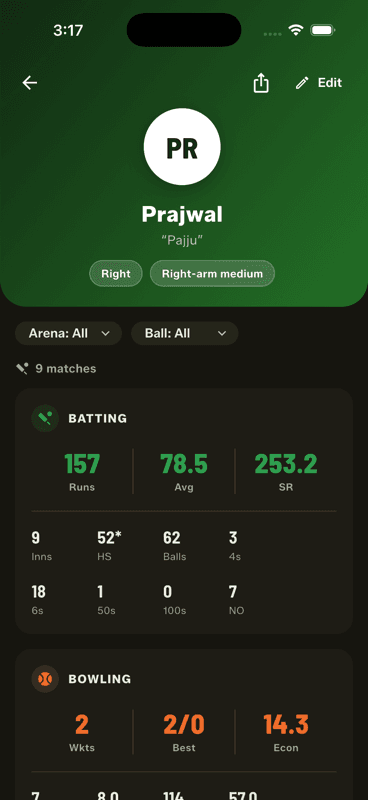
Open a player's profile and tap the share icon in the top right. Their career — runs, average, strike rate, wickets, economy — is exported as a single branded image.

Step by step

  1. 1

    Open the player's profile

    Tap them in the Squad Book.

  2. 2

    Tap the share icon

    Top right, beside Edit.

    Tap the share icon
  3. 3

    Send or save

    Share to any app, or save the image to your gallery.

It respects the filters

Set the arena or ball filter before sharing and the card reflects that filter — a tape-ball-only career card, for instance, rather than a lifetime total that mixes formats.

End of season, a card each, one message to the group. It is the single most-shared thing in the app after the scorecard.

People also ask

How can I share a cricket player's stats?

Export a career card. Gully Crix turns any player's profile into a single branded image with their runs, average, strike rate, wickets and economy.

Can I share stats for one ball type only?

Yes. Set the arena or ball filter before sharing and the card reflects that filter, so a tape-ball-only career card is possible.

Last updated 2026-08-09

Join Gully Crix Telegram Community