v3.6Now on Android: Single Player mode · team profiles · sort by any statCheck it out
All help guides
The over-by-over breakdown
Quick MatchFull Match
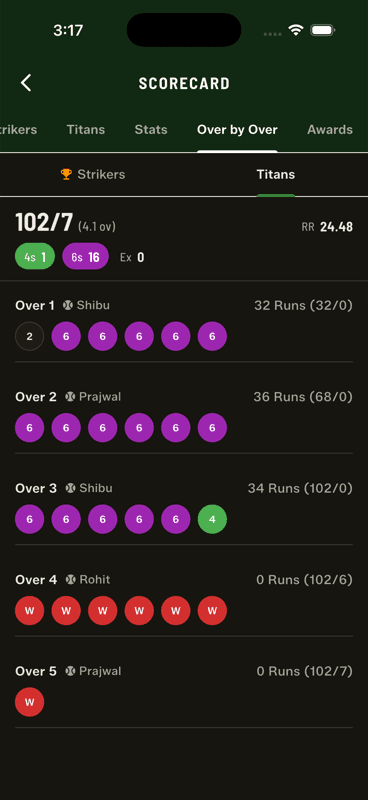
The Over by Over tab replays the innings one over at a time — each ball as a colour-coded chip, with the bowler, the runs from that over and the running score.
Purple sixes, green fours, red wickets — the innings at a glance.
Reading a row
The header gives the over number, the bowler, and 32 Runs (32/0) — runs from this over, and the score at the end of it. The chips below are the balls in order.
The chip colours
Green 4s, purple 6s, red wickets
Orange wides and no-balls
Grey or outlined dots and singles
The summary strip at the top gives the innings run rate, total 4s and 6s, and the extras breakdown.
People also ask
Can I see a cricket match over by over after it finishes?
Yes. Gully Crix keeps every delivery, so each over can be replayed as colour-coded chips with the bowler, the runs from that over and the running score.
What do the coloured circles mean in cricket scoring apps?
In Gully Crix: green for fours, purple for sixes, red for wickets, orange for wides and no-balls, and grey or outlined for dots and singles.