v3.6Now on Android: Single Player mode · team profiles · sort by any statCheck it out
All help guides
How to export a match as a PDF
Quick MatchFull Match
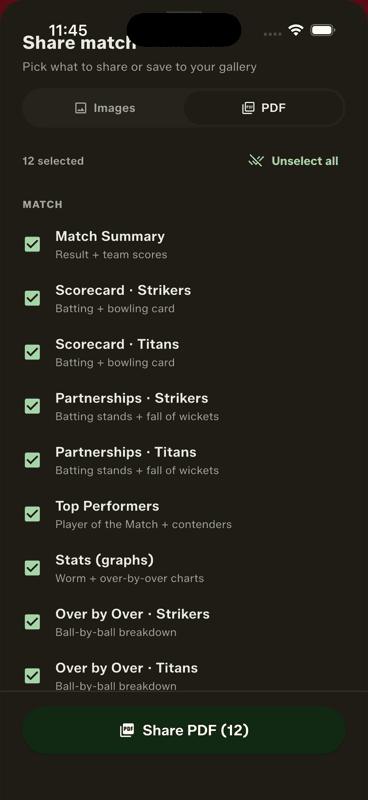
Tap Share on a finished match, switch the format to PDF, choose which cards to include and tap Share PDF. Everything lands in one file, ending with a scan-to-download QR page.
Step by step
1
Open Share on the finished match
From the result screen or the match in your history.
2
Switch to PDF
The Images / PDF selector is at the top. The app remembers your choice.
3
Pick the cards and export
Everything is selected by default. Tap Share PDF to send or save.
When PDF beats images
One file, in order, that survives being forwarded — the right format for a tournament organiser, a league record or an end-of-season archive. Images are better for the group chat, where nobody opens attachments.
Story and square crops are social formats, so they are deliberately left out of the PDF.
The QR page
Every PDF ends with a scan-to-download page. When your scorecard gets forwarded to another team, they can find the app that made it.
People also ask
How do I make a PDF of a cricket scorecard?
Score the match, then export it. Gully Crix bundles the summary, scorecards, over-by-over, partnerships and awards into a single PDF in a couple of taps.
What is the best way to keep a permanent cricket match record?
Export a PDF. A file on your phone does not depend on any link staying online, which matters for league records and end-of-season archives.