v3.6Now on Android: Single Player mode · team profiles · sort by any statCheck it out
All help guides
Team names and colours (and why two teams can't share a shade)
Quick MatchFull Match
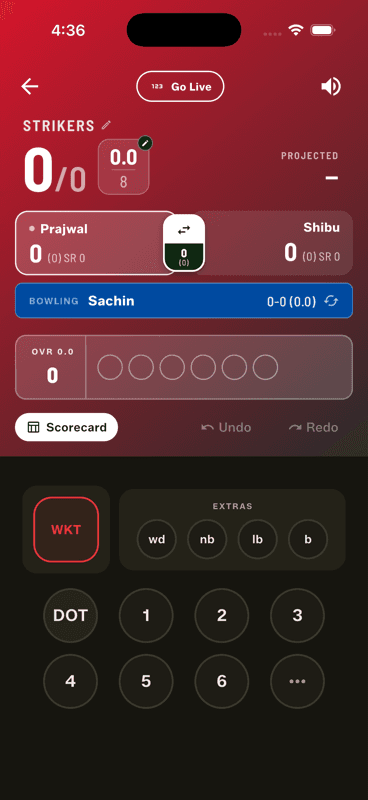
Each team gets a name and a colour. The two teams must use different colours, because the whole scoring screen is colour-coded by team — the score panel, the batter cards and the bowling bar all take the batting or bowling side's colour.
Colour is how you read the screen
Glance at the scoring screen mid-over and you should know instantly who is batting. That works because the score panel takes the batting side's colour and the bowling bar takes the fielding side's — so two teams in the same shade would make the screen unreadable at exactly the moment you need it.
Red batting panel, blue bowling bar — the colours do the explaining.
Changing a colour
Tap the colour dot beside a team at setup. In Full Match this changes the colour for this match, leaving the team sheet's saved colour alone — useful when you meet another side that plays in the same shade.
Some swatches are gradients rather than flat colours. Similar-looking shades are kept visually distinct so a red-vs-maroon match still reads clearly.
Renaming mid-match
The team name on the scoring screen carries a small pencil — tap it to fix a typo without leaving the match.
People also ask
Why can't both cricket teams have the same colour in the app?
Because the scoring screen is colour-coded by team — the score panel takes the batting side's colour and the bowling bar the fielding side's. Two identical shades would make the screen unreadable mid-over.
Can I change a team colour for one match only?
Yes. Tapping the colour dot at setup changes it for that match, leaving your saved team sheet's colour untouched.