v3.6Now on Android: Single Player mode · team profiles · sort by any statCheck it out
All help guides
I closed the app mid-match — is my match lost?
Quick MatchFull Match
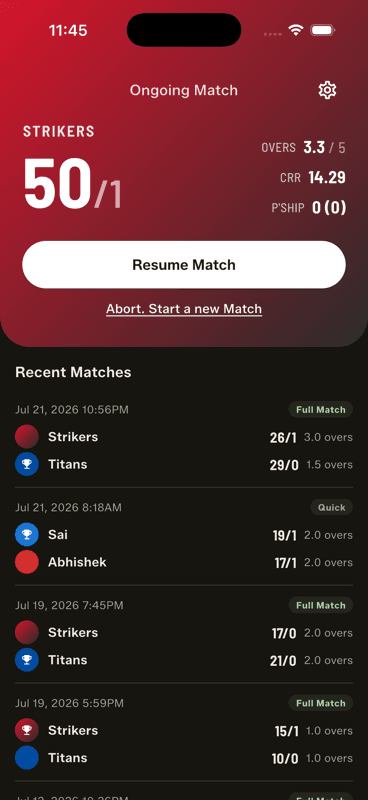
No. The ongoing match is saved on your phone after every ball. Reopen the app and tap Resume Match on the home screen — you will be exactly where you left off, even after a crash or a dead battery.
Step by step
1
Reopen the app
The home screen shows your ongoing match at the top, with the live score and overs.
2
Tap Resume Match
You land back on the scoring screen at the exact ball you left. Nothing needs re-entering.
Why nothing was lost
Every delivery is written to your phone's storage the moment you record it — not when the innings ends, not when you close the app. A crash, a phone call, a dead battery or an accidental swipe-away all land in the same place: the match is intact, one tap from resuming.
This is also why the app works with no internet and no account: the matches live on the device itself.
The one way a match really is gone
Abort. Start a new Match on the home screen permanently deletes the ongoing match — that is why it asks you to confirm. There is no undo for an abort.
Finished matches
Completed matches stay in Recent Matches on the home screen, with the full scorecard, stats and sharing available any time. Spotted a scoring mistake after the handshake? A finished match can be reopened and corrected too.
Because matches live on the device, deleting the app deletes them. Share the PDF of anything you want to keep before uninstalling or switching phones.
People also ask
I closed my cricket scoring app, did I lose the match?
Not in Gully Crix. The ongoing match is written to your phone after every ball, so reopening the app and tapping Resume Match puts you back at the exact delivery you left.
How do I recover a cricket match after my phone crashed?
Simply reopen the app. Because each delivery is saved as it is recorded, a crash, a dead battery or an accidental swipe-away all leave the match intact.
Where are my cricket matches stored?
On your device. That is why the app works with no internet and no account — and also why exporting a PDF is worth doing before you uninstall or change phones.