One-Tap Scoring — DOT, 1, 2, 3, 4, 6, W, Extras
The entire scoring interface was designed around one principle: never slow down the game. Every possible delivery outcome — dot ball, runs, wicket, wide, no-ball, leg bye — is reachable in a single tap. The layout is large, thumb-friendly, and works even mid-sun when the screen glare is fighting you. And when a no-ball is bowled, Gully Crix automatically flags the next delivery as a Free Hit with a bold visual alert — so nothing slips through in the heat of the moment.
When you're the scorer at a gully match, you're also usually the umpire, the timekeeper, and the one fielding stray balls. You don't have a spare moment to dig through menus. One-tap scoring is the core of Gully Crix for exactly that reason: every possible outcome of a delivery is one tap away, so you can keep your eyes on the cricket and your thumb on the pad.
The main pad shows the outcomes you hit most — DOT, 1, 2, 3, 4, 6, and W — as large, thumb-friendly targets that stay readable even in harsh sunlight when screen glare is working against you. Runs update the score instantly. Tapping W opens a quick prompt for the dismissal type and fielder, and the Extras button covers wides, no-balls, leg byes, and byes without breaking your rhythm. Once six legal deliveries are in, the over ends automatically — one less thing to track.
The standout safeguard is the automatic Free Hit. The moment you record a no-ball, Gully Crix flags the next delivery as a Free Hit with a bold on-screen alert, so that crucial rule never slips through in the heat of the moment. It's the kind of detail that keeps a fast, informal game honest.
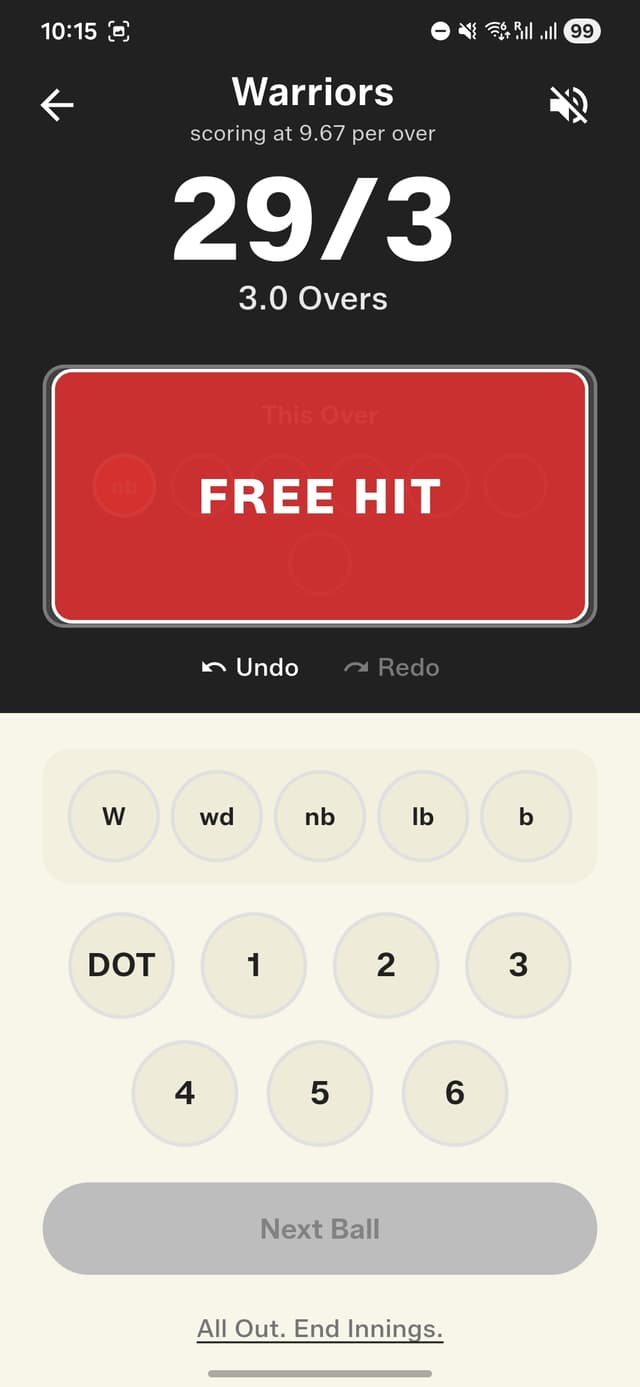
Free Hit alert fires automatically after every no-ball
How to get started
- Start a new match and begin the first over.
- The scoring pad shows all outcomes: DOT, 1, 2, 3, 4, 6, W.
- Tap once for runs — the score updates instantly.
- Tap "W" for a wicket — enter dismissal type and fielder.
- Tap "Extras" for wide, no-ball, leg bye, or bye.
- Tap no-ball — the next delivery is automatically marked as a Free Hit with a bold alert on screen.
- Over ends automatically after 6 legal deliveries.
Frequently asked questions
How many taps does it take to score a ball?
One. Every delivery outcome — dot, runs, wicket, wide, no-ball, leg bye, or bye — is reachable in a single tap so scoring never slows the game down.
Does the app handle Free Hits automatically?
Yes. As soon as you record a no-ball, the next delivery is automatically marked as a Free Hit with a bold visual alert on screen.
Does the over end on its own?
Yes. The over ends automatically once six legal deliveries have been bowled, so you don't have to count them yourself.